Site sign-in & attendance

Your Digital
Doorperson

Clavarius signs your staff and visitors in and out, keeps a live record of everyone on site, and gives you an instant roll-call when it matters most.

Start your 14-day free trial

14 days free  ·  Cancel any time  ·  Set up in minutes
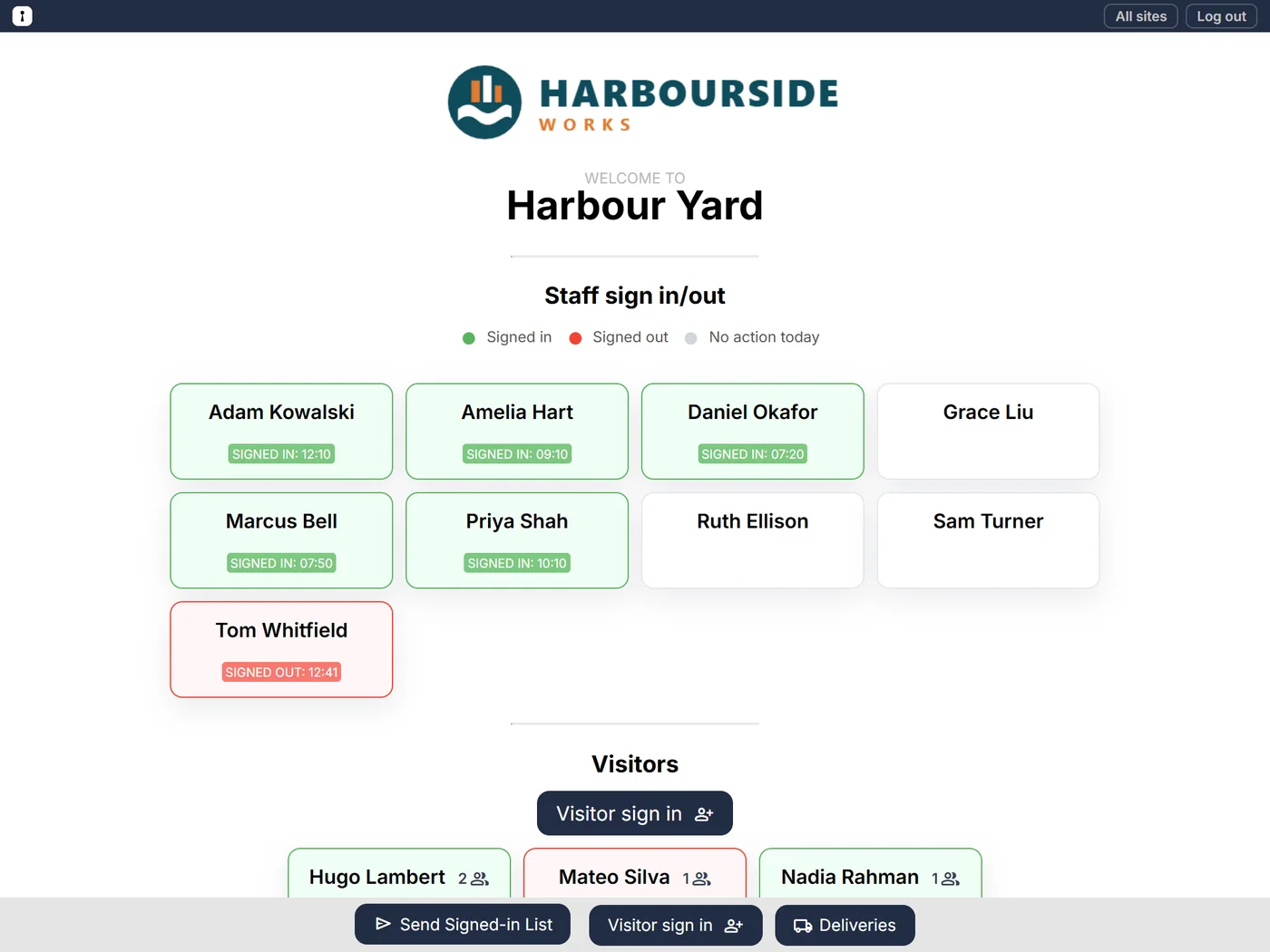
The Clavarius sign-in screen on a tablet: staff tiles showing who is signed in, and today's visitors

Any tablet or browser Nothing to install

Every site, one account Each with its own screen

One-tap roll-call Emailed in seconds

No per-person fees Plans are priced by site

How it works

Up and running this afternoon

No hardware to buy and no app to roll out. If it has a web browser, it can be your front desk.

  1. 1

    Add your sites and people

    Create each location, add your team, and choose which sites each person works at. Upload your logo while you’re there.

  2. 2

    Put a tablet by the door

    Sign it in with a tablet-only login that can’t reach your settings, open the site’s page, and leave it there.

  3. 3

    Know who’s in

    Staff tap their name, visitors fill in a short form, and you always have an up-to-date list — ready for any drill or audit.

Harbourside Works LtdSign-in screens
OverviewPeopleSitesSafetyReportsSettings
Create site
Create site
NameSign-in screenActive
Head Office/site/head-officeYes
People · 3 added
AHAmelia HartHead Office
DODaniel OkaforAll sites
PSPriya ShahHead Office
Log out
Choose a site
Head Office ›
Riverside Depot ›
Welcome toHead Office
Amelia Hart
Daniel Okafor
Priya Shah
Marcus Bell
Ruth Ellison
Sam Turner
Send Signed-in ListVisitor sign in
A tablet-only login. It can open the sign-in screens and nothing else, so nobody at the door can reach your settings.
Log out
Welcome toHead Office
Amelia HartSIGNED IN 08:02
Daniel OkaforSIGNED IN 08:05
Priya ShahSIGNED IN 08:12
Marcus Bell
Ruth Ellison
Sam Turner
Ethan Clarke · Northwick Plumbing · group of 2
Send Signed-in ListVisitor sign in
On site now · Head Office
0staff0visitor
Sent Signed-in List to fire.marshal@example.com · 4 people on site
Setting up: add your sites and people
Features

Everything at the front door, nothing in the way

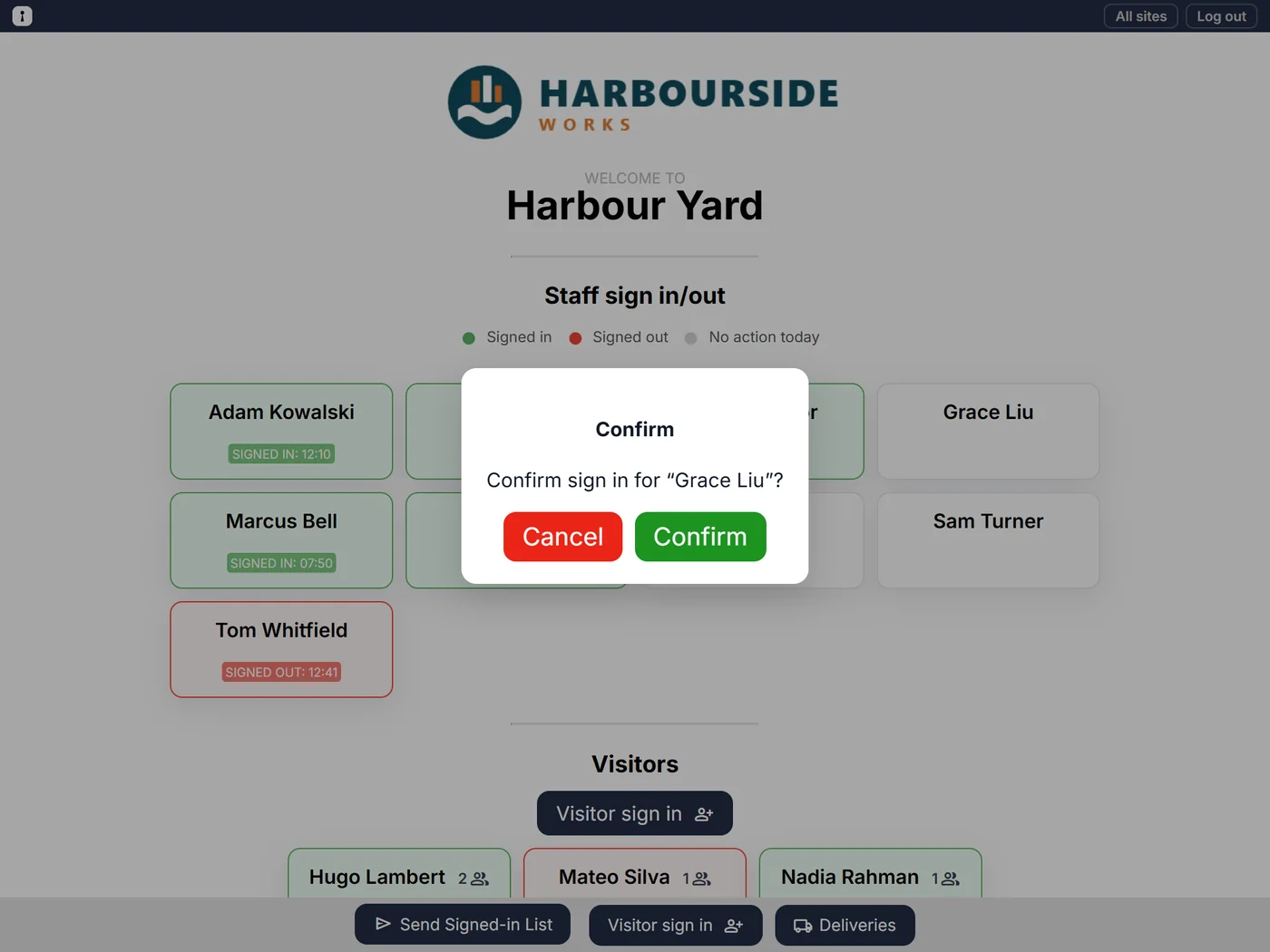
Staff sign in with one tap

Everyone who works at a site has a tile. Tap, confirm, done — green for in, red for out, with the time on the tile.
  • Signing in at a second site signs you out of the first
  • People only appear at the sites they work at
  • Forgotten sign-outs are tidied up automatically
Confirming a staff sign-in on the tablet

Visitors sign themselves in

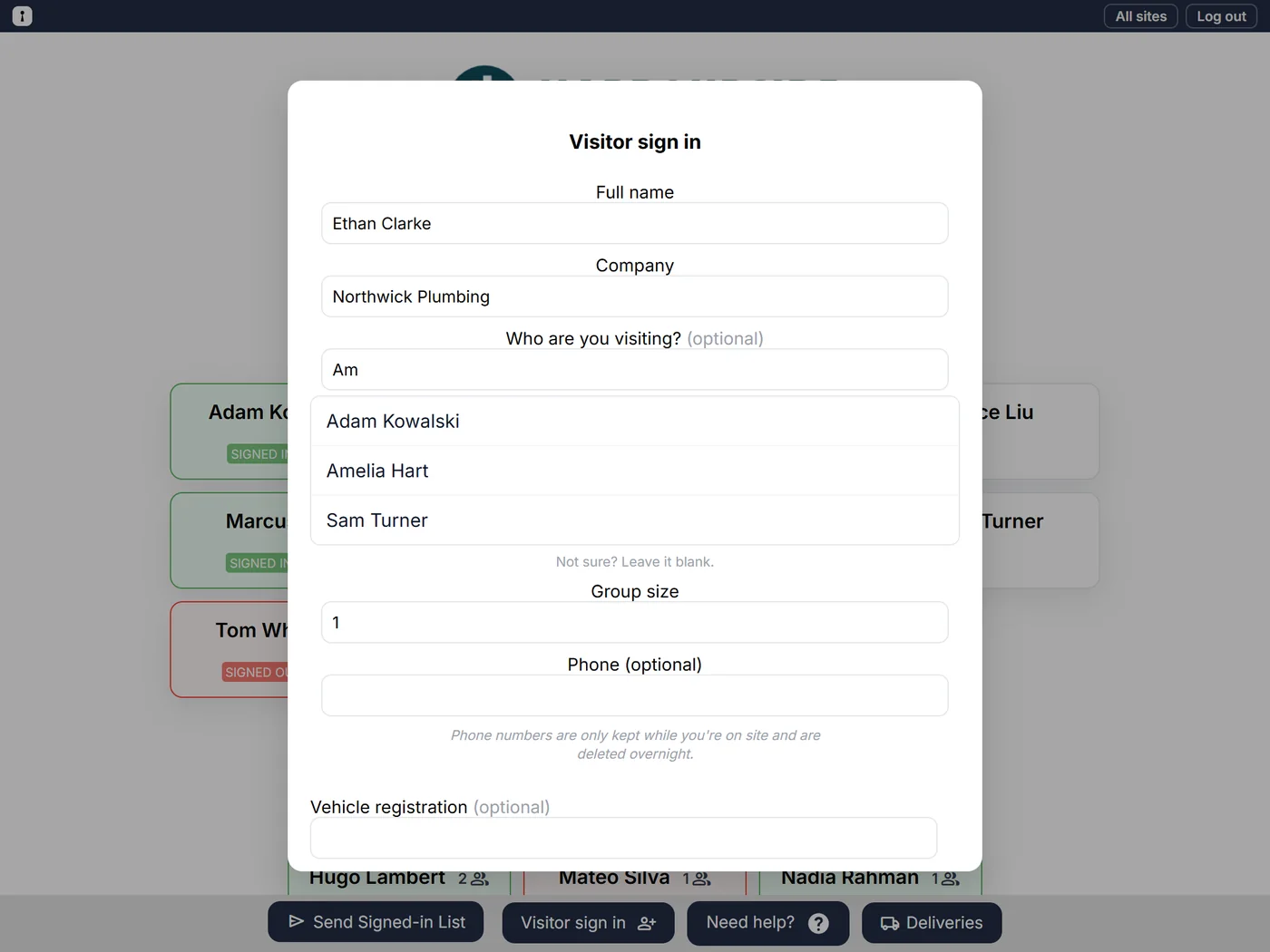
Name, company and group size, with an optional phone number for emergencies. No app, no account, no queue at reception.
  • Group sizes counted in every roll-call
  • Phone numbers deleted overnight once they’ve left
The visitor sign-in form on the tablet

Deliveries, logged and announced

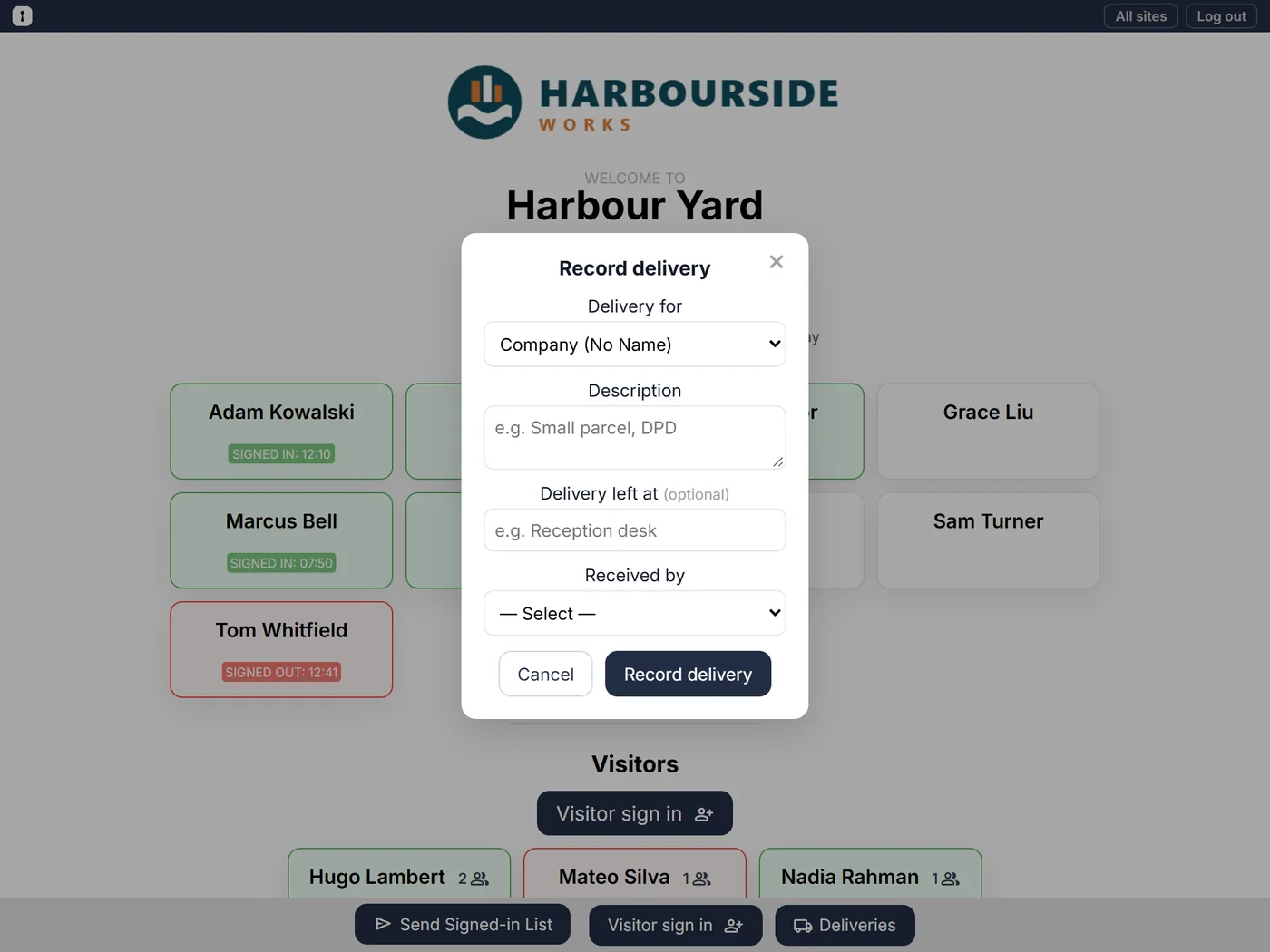
Record a parcel at the tablet and the person it’s for gets an email with what arrived, who took it in and where it’s waiting.
  • Turn it on for the sites that need it
  • Company parcels go to the inboxes you choose
Recording a delivery on the tablet

Reports that answer real questions

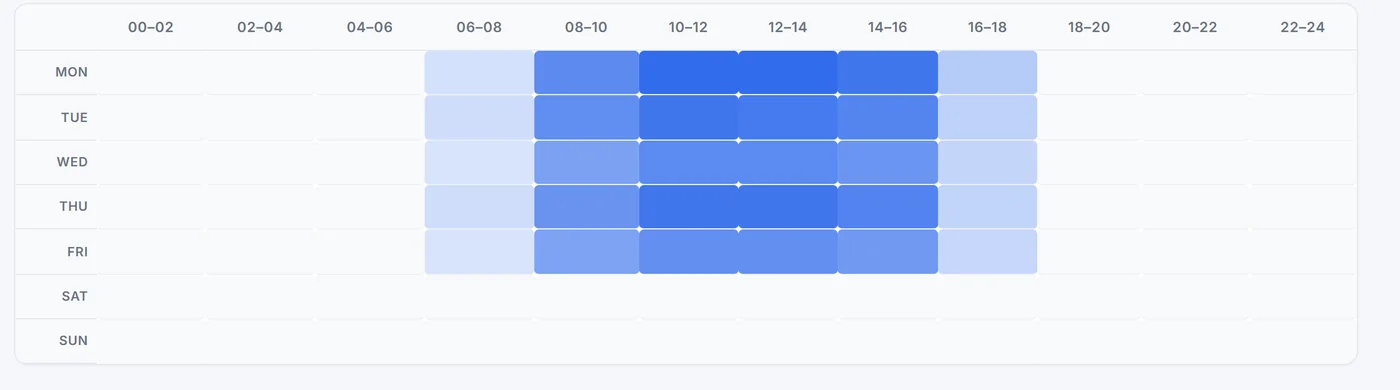
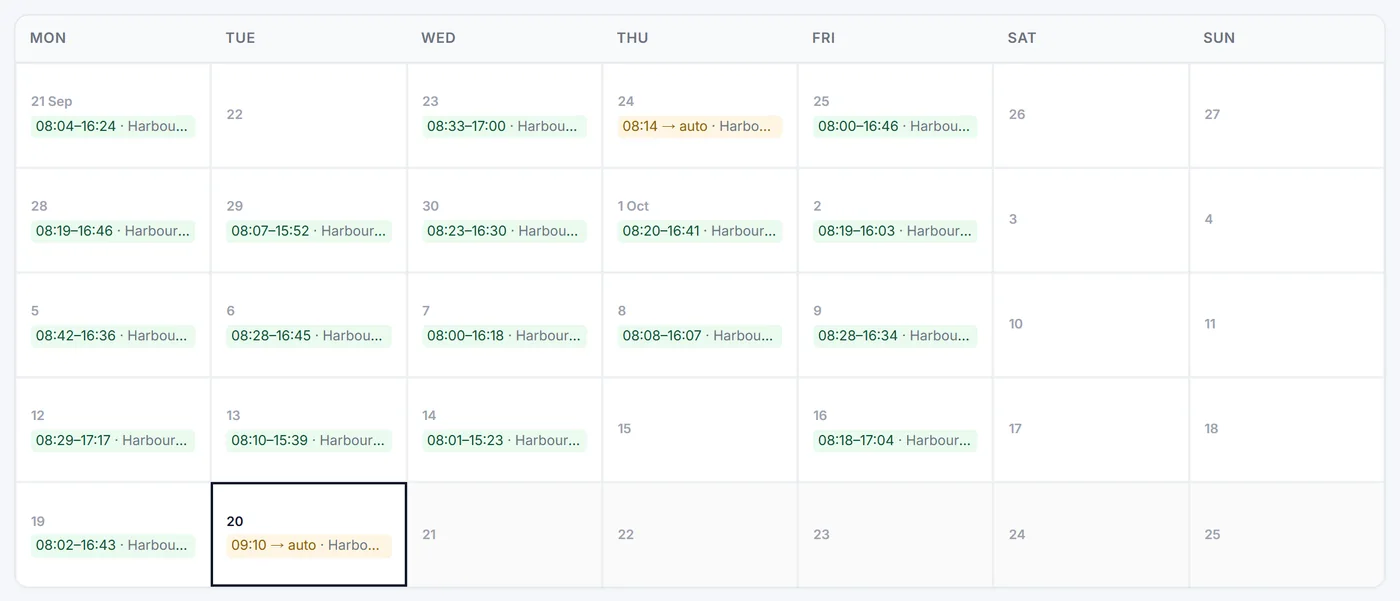
When is each site busiest? Who works alone, and when? Who keeps forgetting to sign out? It’s all there, for the last 30 or 90 days.
  • Heatmap of busy times for every site
  • Each person’s work pattern as a calendar
  • Lone-working periods, flagged for you
A heatmap of busy times by day and hour at one site
One person's sign-in times shown as a monthly calendar

Admin that stays out of your way

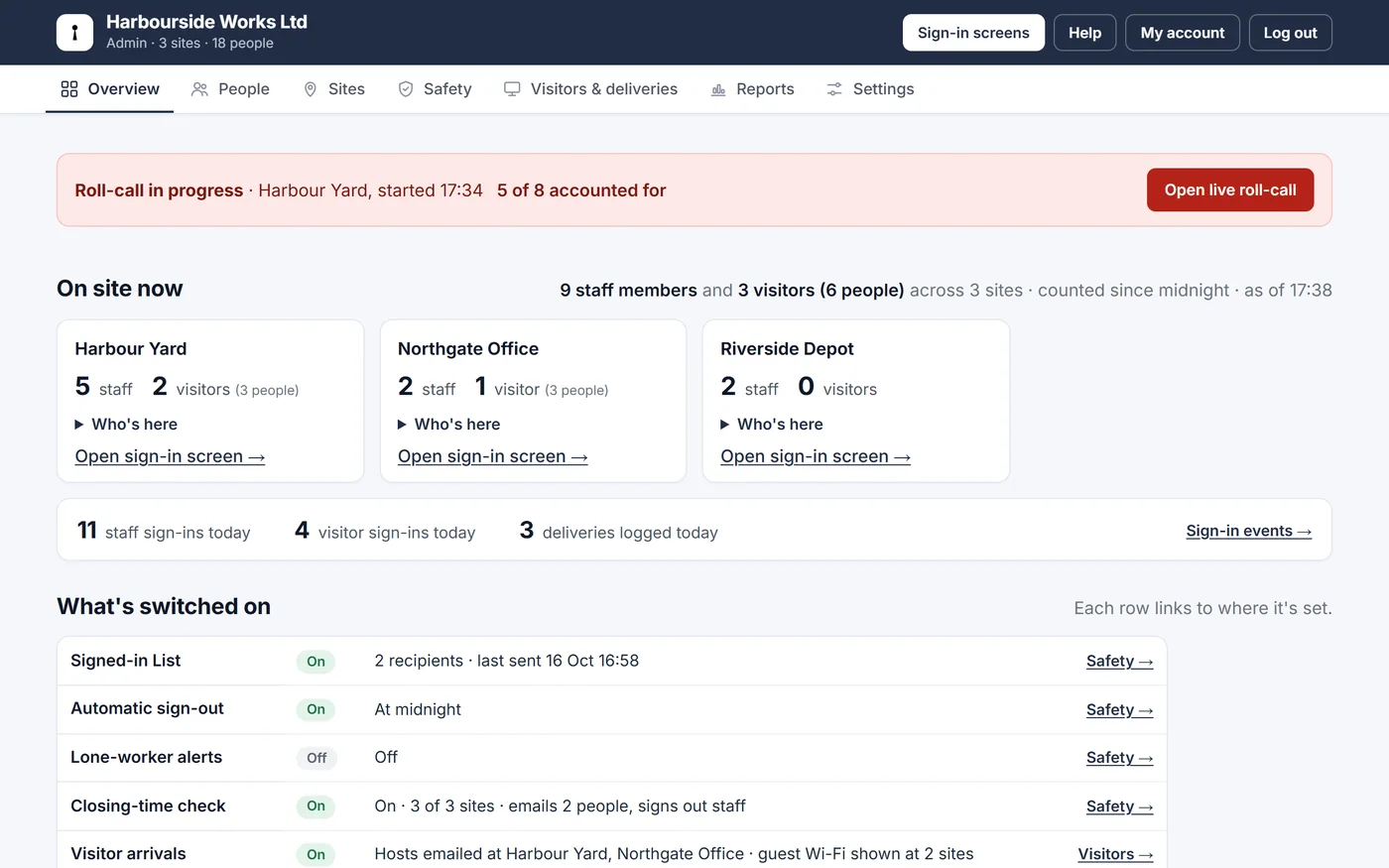
Admin starts with who’s on site right now, today’s numbers and what’s switched on. Add people, sites and tablet logins in a few clicks, put your logo on every screen, and search or export the whole history.
  • Who’s on site at every location, at a glance
  • Full history of sign-ins, emails and deliveries
  • A help centre with step-by-step guides
See the full feature list
The Overview page: who is on site at each location, with today’s numbers and a table of what is switched on
All features

Everything Clavarius does

72 features, and every one of them is included in every plan. Open a section to see what's in it.

Sign-in screens 11
  • Works on any tablet or browser Nothing to install and no special hardware: open your site's page and leave it by the door.
  • One-tap staff sign in and out Each person has a tile; tap and confirm. Green for in, red for out, with the time.
  • Sign in on your phone Staff and visitors scan a QR code and sign in or out on their own phone. The screen's code changes every minute, and there's a printable poster too.
  • Welcome screen When a tablet is idle, it shows your logo and a large sign-in code. Any tap goes back.
  • Find your name At sites with lots of staff, a search box above the names narrows the list as you type. You choose how many staff a site needs before it appears.
  • One person, one site Signing in at a second site signs you out of the first, so nobody is counted twice.
  • The right people at each site Staff only appear on the screens of the sites they work at.
  • Your logo and site name Every sign-in screen carries your branding.
  • Tablet-only logins Tablets use an access account that can't reach your settings, and stays signed in for weeks.
  • Choose-a-site screen Large, easy-to-tap cards for picking which site a tablet is at.
  • Always up to date Screens refresh themselves through the day, so they never go stale.
Visitors 11
  • Self-service visitor sign-in Name, company, group size and an optional phone number. No app or account needed.
  • Sign out with a tap Today's visitors are listed on the screen; tap a card to sign them out.
  • Tell the person they're visiting Visitors choose who they're here to see (optional or required, per site) and that person is emailed straight away.
  • Guest Wi-Fi Show your guest Wi-Fi details on the visitor's sign-in confirmation, with a QR code to join from their phone.
  • Visitor agreements Visitors accept your site rules or an NDA before they sign in. One for every site, or one per site, with every version kept.
  • Signatures Ask visitors to sign the agreement with a finger on the tablet, and see each signature later.
  • Need help? button Visitors can ask reception to come to the sign-in screen when the front desk is empty.
  • Copies for assistants An assistant or deputy can get someone's visitor and delivery emails too.
  • Group sizes counted Visitors' group sizes are included in every roll-call. Anyone named in a group gets their own line to tick off.
  • Sign-in questions Your own questions on the visitor form, such as a car registration or the reason for the visit, with the answers kept with each visit.
  • Phone numbers deleted overnight Kept only while the visitor is on site, for emergencies.
Safety and fire roll-call 17
  • Lone-worker alerts An email when someone has been alone on site for too long, with a one-tap "I've checked on them" and an all-clear when they're no longer alone.
  • Escalation and check-ins Escalate to a second contact if nobody responds, and ask people working alone to tap "I'm OK" at set intervals.
  • Closing-time check At each site's closing time, an email listing anyone still signed in, with the option to sign them out.
  • Maximum on site Set a limit per site; the sign-in screen warns when it's reached and the people you choose are emailed. Nobody is stopped from signing in.
  • Choose who's alerted Pick people from your People list or type any email address. Alerts follow people if their email changes.
  • Live roll-call Marshals tick people Safe or Not found on their phones together, with a live count and a summary email when it's done.
  • Emergency screen on the tablets During a roll-call every sign-in tablet at the site shows where to go, with a button to open the live roll-call.
  • Works when the internet drops Tablets keep a copy of who's on site, so you can still tick people off and print the list, then submit the roll-call when the connection is back.
  • Assembly points Set one for each site; it's shown on the tablets, the Signed-in List, the roll-call and to visitors.
  • Fire drill records Mark a roll-call as a drill and keep a record of each one: time taken and who was missing.
  • Fire marshals and first aiders Flag them on the People tab; they're labelled on roll-calls and the Signed-in List.
  • One-tap Signed-in List Email everyone who's on site to up to five contacts, from any sign-in screen.
  • One site or every site Send the list for the site you're at, or one email covering all of your sites with totals.
  • Everything a marshal needs Staff names, plus visitors with company, group size and phone number.
  • Live view-only links A list of who's on site for a marshal's phone or a reception screen, no login, updating every minute.
  • Links you control Limit a link to certain sites, label it, and revoke it at any time.
  • Right for night shifts Forgotten sign-outs clear at midnight, or after a set number of hours so night workers stay on the list.
Deliveries 5
  • Record parcels at the tablet Who it's for, what it is, where it was left and who took it in.
  • Instant email to the recipient They know straight away; company parcels go to the inboxes you choose.
  • Delivery log Recent deliveries on the sign-in screen, or shared with a view-only link.
  • Only where you need it Turn deliveries on for all sites or just some.
  • Delivery history Every delivery across all sites in one searchable report, filterable by person, description, site and date.
Reports 6
  • Work Patterns A calendar of each person's time on site, with missed sign-outs highlighted.
  • Location Heatmap The busiest days and times at every site, in two-hour blocks.
  • Lone Worker Every period when one person was alone on site, from 15 minutes to 3 hours.
  • Forgotten sign-outs Who most often forgets to sign out.
  • Exceptions Missed sign-outs, long days and staff with no sign-ins, from the last 7 or 30 days.
  • 30 or 90 days Reports cover the last 30 or 90 days, so you can compare this month with the last three.
Admin 10
  • Overview Everyone on site across all your sites in one live list, with today's activity, and what's switched on on its own tab.
  • Sign out from the office Sign out someone who forgot, from the Overview. The log shows an admin did it.
  • Email everyone on site One email to everyone signed in at a site, or all sites, showing exactly who it will reach first.
  • People and sites Add people, choose their sites, deactivate leavers; add, deactivate and archive sites, and copy each sign-in screen's address.
  • Import and export with a spreadsheet Add your whole team from a CSV file, including fire marshals, first aiders and who can receive visitors, or export everyone, edit in bulk and import it back. You see every change before it's saved.
  • Sign-in events Every sign in and out, searchable by name, company and site, and filterable by date.
  • Emails sent Every email Clavarius sends for you, marked delivered, retrying or failed, with the reason.
  • Branding Your company name and logo on screens, view-only links and emails.
  • Help on every page A Help button opens the step-by-step guide for the page you're on.
  • Getting-started checklist New accounts are walked through setup, step by step.
Privacy & security 8
  • Your data kept separate Each organisation's data is walled off from everyone else's.
  • Encrypted Connections are encrypted, and so are backups.
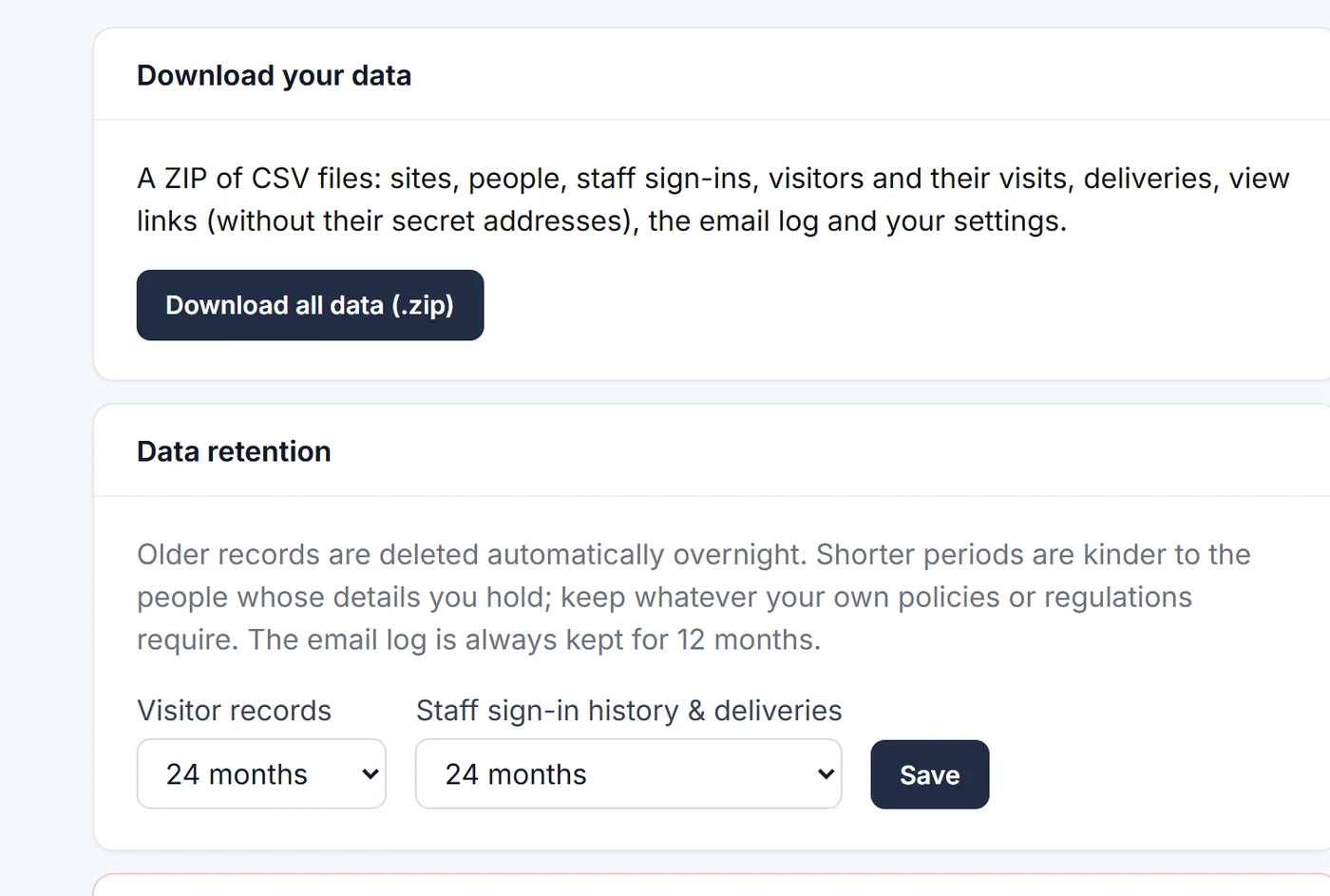
  • Export everything Download all of your data as spreadsheets in one ZIP.
  • Retention you choose Keep records for 3 months to 3 years, or for ever; older ones are deleted overnight.
  • Erase on request Remove one person's details without breaking your history.
  • Close your account yourself With 30 days to change your mind before everything is deleted.
  • Secure logins Password reset by email, protection against repeated wrong passwords, and no advertising or tracking cookies.
  • Staff PINs Ask staff for a 4-digit PIN on their phone, or on the tablet too, at every site or the ones you choose.
Plans & support 4
  • 14-day free trial Try any plan in full; nothing is charged until the trial ends.
  • Priced by site Unlimited staff and visitors on every plan, monthly or annual.
  • Change or cancel any time From the Subscription page in your admin area, with invoices to download.
  • Help centre and email support Step-by-step guides with screenshots, and real people on email.
Fire roll-call

When the alarm goes, you know who’s inside

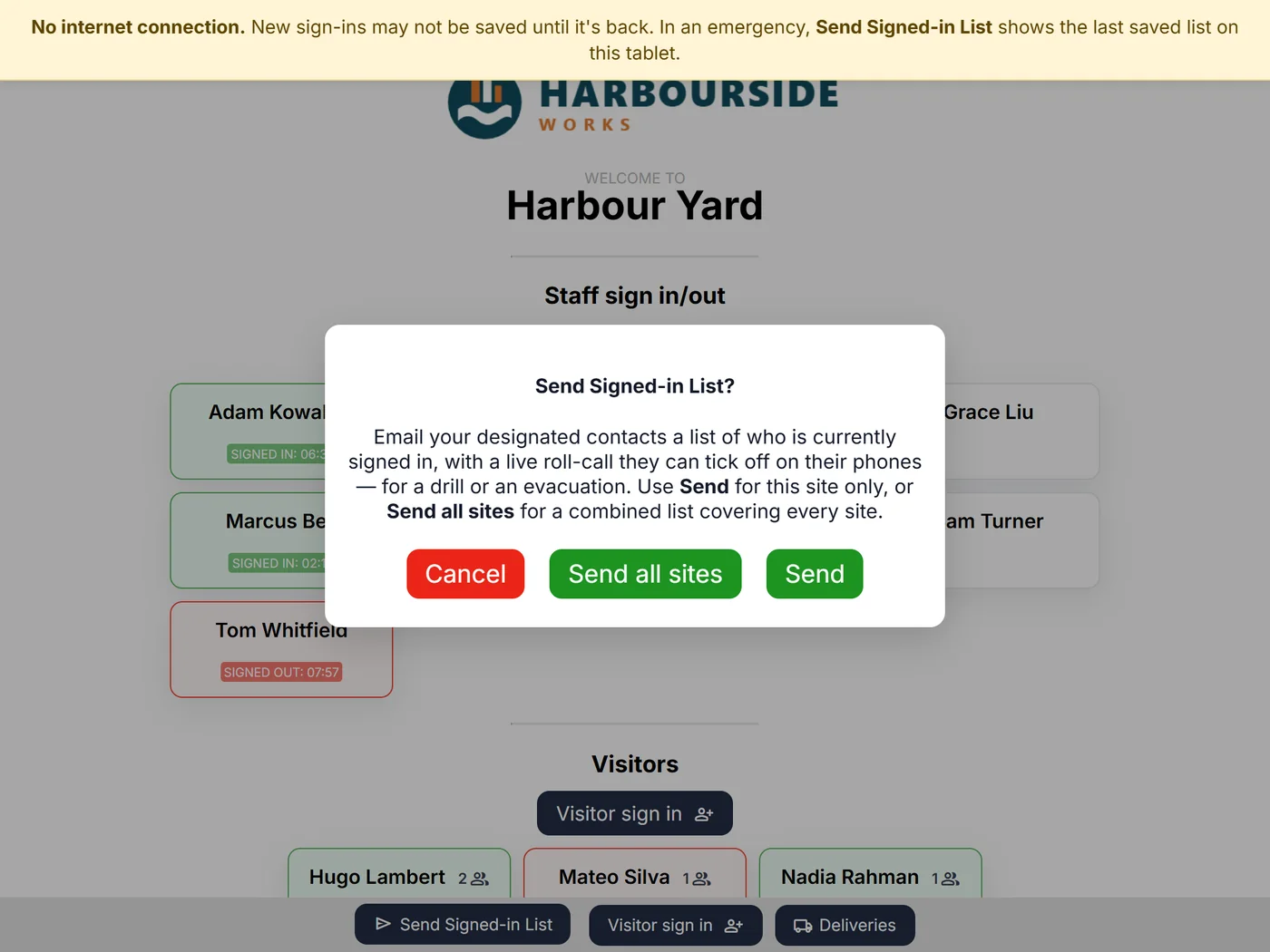
Anyone at the tablet can send the Signed-in List with one tap — for this site or every site at once. It lands in your fire marshals’ inboxes with every member of staff and every visitor still on site, including group sizes and visitors’ phone numbers.
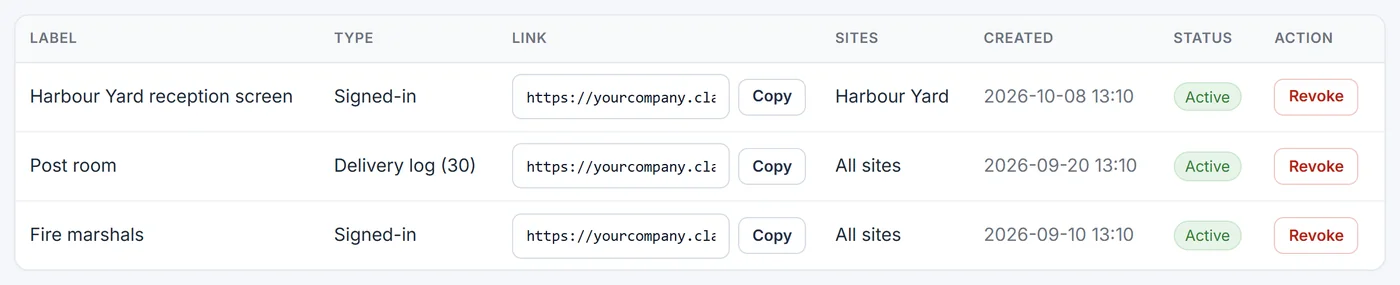
  • Live view for marshals. Share a view-only link that shows who’s on site right now, on any phone, with no login. Revoke it whenever you like.
  • Right for night shifts. Choose whether forgotten sign-outs clear at midnight or after a set number of hours, so night workers stay on the list.
  • Every site at once. One email covering all your locations, with totals.
Sending the Signed-in List from the tablet
View-only links for fire marshals and a reception screen
The Data & privacy page: download your data and choose how long records are kept
Privacy built in

Your data, under your control

Clavarius holds personal details about your staff and visitors, so we built the controls you need under UK GDPR straight into the product.

Export everything One click downloads all your data as spreadsheets.

Keep only what you need Choose how long records are kept; older ones are deleted overnight.

Erase on request Remove one person’s details without breaking your history.

Kept separate, kept safe Your organisation’s data is walled off from everyone else’s, sent encrypted and backed up encrypted.

No advertising or tracking cookies — only the ones that keep you signed in.

Pricing

Priced by site. Not by person.

Every plan includes every feature, unlimited staff and unlimited visitors. Pick the number of sites you need.

Professional

Up to 8 sites

£99/ month

For organisations spread across locations.

Start free trial

Included in every plan

  • Staff & visitor sign-in
  • One-tap fire roll-call
  • Live view-only links
  • Deliveries with email alerts
  • Reports & analytics
  • Your branding
  • Data export & retention controls
  • Email support & help centre
See the full feature list

14-day free trial on every plan. No VAT is added: the price you see is the price you pay. More than 8 sites? Talk to us about Enterprise.

No marketing emails, ever: we only email you about your account and your sites. Your data stays in the UK, kept apart from every other customer’s. How we look after it.

Questions

Good questions

Can’t see yours? The help centre has step-by-step guides, or email hello@clavarius.io.

Do I need special hardware?

No. Any tablet, laptop or computer with an up-to-date web browser works. Most customers use an ordinary tablet on a stand by the entrance.

Do visitors or staff need an app or an account?

No. Staff tap their name and visitors fill in a short form on the tablet. Only admins have a login.

How does the free trial work?

You get 14 days of the plan you choose with everything switched on. You add a card when you start, but nothing is charged until the trial ends, and you can cancel any time before then.

Can I change plan or cancel later?

Yes, any time, from the Subscription page in your admin area. Plans differ only in how many sites can be active at once. Changing plan during the free trial ends the trial and starts the new plan straight away.

What if someone forgets to sign out?

Clavarius signs them out automatically, at midnight or after a set number of hours — you choose. Reports show who forgets most, so you can have a word.

Can a tablet at the door get into our settings?

No. Tablets sign in with an access account that can only use the sign-in screens. Your admin area needs your own login.

How do you look after our data?

Your organisation’s data is kept separate from everyone else’s, travels encrypted and is backed up encrypted. You can export it, choose how long it’s kept, erase individuals, and close your account yourself — everything is deleted 30 days later. Read how we look after it.

Open your digital front door

Set up your sites, add your people and put a tablet by the door — today.

Start your 14-day free trial

14 days free · Cancel any time

Scroll to Top